


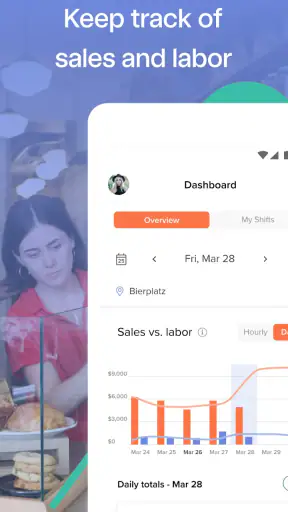
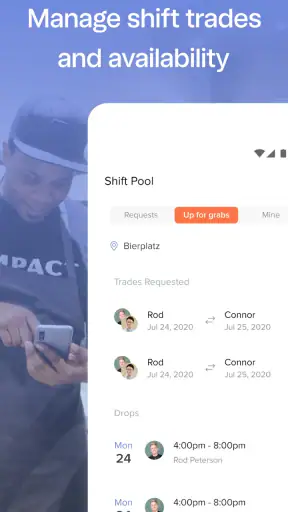
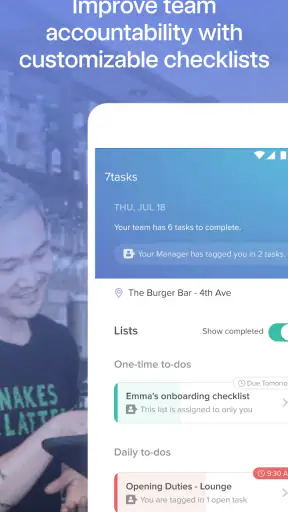
Running a restaurant schedule from a shared spreadsheet, a group chat, and a separate clock-in system can turn a simple staffing change into a chain of small mistakes. I tested 7shifts: Employee Scheduling with that kind of busy operation in mind, following the process from building a rota to communicating changes and checking what happened afterward. My overall impression is that it is most useful when a restaurant needs one practical place for scheduling, time tracking, payroll-related work, tips, and team communication rather than a collection of disconnected tools.
This is a free business app from 7shifts, Inc., aimed specifically at restaurant teams. It has been around since August 23, 2013, and its current version is 2026.34.0. The app is rated for Everyone, supports Android 7.0 and later, and has passed the one-million-install mark. Its average sits at 4.6 from roughly nine thousand ratings, with about 2.3 thousand written reviews. Those figures suggest a well-established product, but they do not remove the need to check whether its restaurant-centered workflow matches the way your own team operates.
From an empty rota to a workable restaurant shift
The starting condition: too many moving parts
The strongest reason to consider this app is not simply that it can display shifts. Most calendar tools can do that. The more important question is whether the schedule can become the shared reference point for managers and employees. In a restaurant, availability changes, late swaps, overtime concerns, clocking details, tip information, and last-minute messages often overlap. A tool built around that environment has a better chance of keeping the handoff understandable.
I would begin by treating 7shifts as the operational center rather than as another calendar layered on top of an existing process. The manager creates the restaurant’s scheduling structure, adds the relevant roles and team members, and then works through availability and coverage. The useful mindset is to prepare the information once and use it repeatedly, instead of typing the same details into a spreadsheet, a messaging app, and a payroll workflow.
That setup takes more thought than downloading the app and immediately posting a shift. A small café with a handful of people may get through configuration quickly, while a restaurant with several service areas, changing roles, and multiple managers needs to agree on naming and responsibilities first. If those foundations are messy, the app will not magically make the schedule clear. It will simply make an unclear process more centralized.
Building the schedule step by step
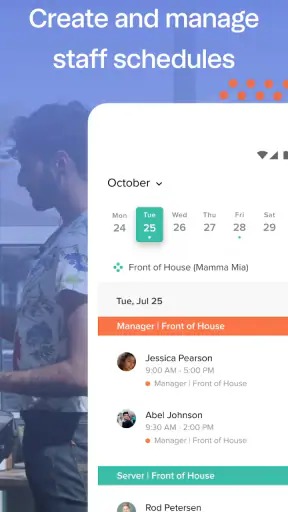
Once the basic team information is in place, the day-to-day flow becomes easier to understand. A manager starts with the coverage the restaurant needs, assigns people to the appropriate shifts, and reviews the result before publishing it. This is where the app’s restaurant focus matters: the schedule is not just a list of working hours, but a plan for who is expected to be present in particular roles during service.
I found it helpful to review the rota in two passes. The first pass is about coverage: are the required positions filled during opening preparation, the busiest service period, and closing? The second is about practicality: are people scheduled when they are available, are there awkward gaps between shifts, and does the plan create avoidable pressure on the same employees? Separating those checks prevents a visually full schedule from being mistaken for a sensible one.
A useful, less obvious habit is to use the schedule as a conversation starter before publishing it, not merely as a final notice. If a manager waits until the rota is already live to discover a conflict, the app becomes a place for corrections. If the manager reviews availability and expected coverage first, it becomes a planning tool. That difference is important in restaurants, where a small change at the start of the day can affect prep, service, and closing.
The app is particularly suitable for recurring patterns. A restaurant that regularly repeats lunch, dinner, bar, kitchen, or closing coverage can save mental effort by working from a familiar structure instead of rebuilding every week from scratch. I would still inspect each new schedule manually, because recurring patterns can preserve an old mistake just as easily as they preserve a useful routine.
Publishing without losing the human handoff
Publishing is the point where a manager’s plan becomes an employee’s commitment. This is also where many scheduling systems fail in practice: the schedule exists, but nobody is sure which version is current. With 7shifts, the goal is to give the team one place to check their shifts and receive relevant communication. That is more reliable than sending a spreadsheet attachment and hoping everyone opens the latest copy.
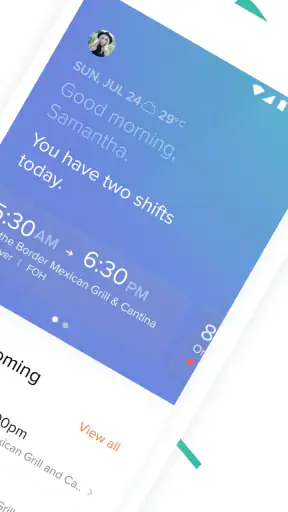
For a team member, the important questions are straightforward. What shift am I working, when does it begin, what role am I covering, and has anything changed? A schedule app earns its place when employees can answer those questions without asking a manager to resend information. That reduces interruptions for supervisors and makes responsibility clearer for staff.
I would establish a simple internal rule: the published schedule is the source of truth, while messages explain changes rather than replace the schedule. This is one of the most practical ways to avoid confusion. If a shift is moved, update the official schedule and then communicate the reason or urgency. A chat message alone can disappear into a busy conversation, while the schedule remains the record people consult before arriving.
Handoffs between managers and employees
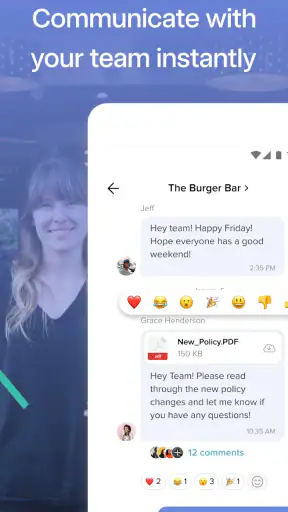
The next stage is less about creating shifts and more about managing the gaps between people. A manager may publish the rota, an employee may need a change, and another supervisor may be responsible for confirming the adjustment. The app’s communication and scheduling focus can make that chain easier to follow, provided the restaurant agrees on who has authority to approve changes.
This is an important trade-off. Centralized communication can reduce scattered messages, but it does not eliminate the need for clear rules. If every employee assumes that mentioning a swap means it is approved, the schedule can become inaccurate. I would make the approval step explicit: a proposed change is not final until the official schedule reflects it or the responsible manager confirms it through the agreed process.
That workflow is especially useful for a realistic Friday scenario. Imagine a server scheduled for an evening shift becomes unavailable in the afternoon. The manager checks the current rota, identifies the affected role, communicates with the team, and updates the official assignment once the replacement is confirmed. The arriving staff member can then check the current plan instead of relying on a forwarded message. The value is not that the app prevents emergencies; it gives the emergency a clearer path through the organization.
For larger restaurants, the handoff between managers deserves extra attention. One person may build the first draft, another may adjust coverage, and a third may oversee the shift itself. I would avoid informal “I thought you handled it” arrangements and use the app alongside a simple responsibility rule. A scheduling platform can show the outcome, but people still need to know who reviews availability, who publishes, and who handles same-day changes.
Time clocking, payroll work, and tips
Scheduling tells the team when work is planned; time clocking helps compare that plan with what actually happened. That distinction is valuable because restaurants rarely run exactly on schedule. Opening may take longer, service may finish late, or a manager may ask someone to stay. Keeping planned shifts and recorded working time connected can make the follow-up more meaningful than comparing a rota with handwritten notes.
I would use this part of the workflow as a review tool rather than as a way to blame employees for every difference. A clock-in or clock-out variation can point to a genuine staffing issue, a closing process that regularly overruns, or a schedule that needs adjustment. Looking at those patterns helps a manager improve the next rota. The app’s payroll-related and tips-oriented functions also make it more relevant to restaurant operations than a general employee calendar.
There is a practical limitation here: no app can resolve disagreements about time or tips without a consistent workplace process. Managers still need to review records, correct mistakes carefully, and explain how adjustments are handled. If the restaurant expects the software to make payroll decisions automatically without human checking, disappointment is likely. The benefit is organization and visibility, not the removal of managerial responsibility.
For employees, the clearest approach is to make clocking behavior part of the normal shift routine. They should know when to record the start and end of work and whom to tell if something goes wrong. For managers, the useful habit is to check exceptions before payroll work becomes urgent. A short review after a busy period is easier than trying to reconstruct several days from memory.
The result: a shared operational picture
When the workflow is followed consistently, the result is more than a prettier schedule. Managers can plan coverage, employees can check their commitments, and the restaurant has a clearer trail from planned hours to actual work. Communication sits closer to the schedule, which reduces the risk that an important change exists only in a private conversation.
This is where I see the app’s main advantage over a spreadsheet. A spreadsheet can be flexible and familiar, but it usually depends on manual formatting, separate messages, and someone remembering to distribute the newest version. 7shifts is better suited to a restaurant that wants scheduling, communication, time clocking, payroll-related tasks, and tips handled as connected parts of one routine.
It also compares favorably with a general calendar when the team needs restaurant-specific context. A standard calendar may show when someone is busy, but it is not designed around service coverage or the relationship between scheduled work and recorded time. On the other hand, a simple calendar may be the better choice for a very small operation where one person handles the rota informally and the extra structure would feel unnecessary.
The free price makes it easy to explore without committing money at the outset, which is useful for a manager who wants to test whether the team will actually use a centralized workflow. I would judge it by adoption rather than by the number of available screens. If employees continue checking old messages and managers keep editing separate spreadsheets, the restaurant has not gained much, regardless of how capable the app may be.
Where the flow breaks
The first likely break is poor setup. If roles are inconsistent, availability is outdated, or managers use different conventions, the schedule can become difficult to interpret. I would spend time creating a clean structure before inviting the whole team, then explain how employees should check shifts and report problems. That small investment is more valuable than rushing to publish the first rota.
The second break is notification fatigue and communication overload. A restaurant can generate many small updates, and not every message deserves the same urgency. If the team receives constant chatter, important schedule changes may be overlooked. Managers should keep routine discussion separate from genuinely actionable updates and make the official schedule change whenever the commitment changes.
The third break is over-centralization. Putting everything in one app sounds efficient, but it can make the process feel heavy for a tiny team that only needs a basic weekly list. A small owner-operated café may prefer a simpler tool if scheduling is handled by direct conversation and the workforce rarely changes. In that situation, 7shifts may introduce more administration than it removes.
Another limitation is that the app cannot compensate for weak staffing decisions. It can help expose an uncovered role or a mismatch between planned and recorded time, but a manager still has to decide whether to hire, move people, shorten service, or accept the operational consequence. I appreciate tools more when they make those decisions visible rather than pretending to make them automatically.
There is also a learning curve for employees who are not comfortable with workplace apps. The Everyone age rating makes the product broadly accessible in terms of content, but that does not mean every team member will immediately understand the workflow. A short demonstration, a clear rule about schedule changes, and a named person for support can prevent avoidable frustration.
Who should use it and who should look elsewhere
I would recommend 7shifts to restaurant managers who are tired of reconciling a rota with group messages, paper notes, and separate time records. It is a strong fit for teams where shift coverage changes frequently, several people share scheduling responsibility, or managers need a closer connection between planned work and payroll-related follow-up.
It is also a sensible option for a growing restaurant that has outgrown an informal process but does not want to assemble several specialist tools immediately. The app’s restaurant-centered design gives it a clearer purpose than a general project-management product, especially when tips and time clocking belong in the same operational conversation.
I would be more cautious if you only need a static calendar, if your team is extremely small, or if employees are unlikely to check an app consistently. In those cases, a lightweight calendar or a carefully maintained shared document may be easier to operate. The right comparison is not between the longest feature list and the shortest one; it is between the workflow your team will actually follow and the workflow the software expects.
Before rolling it out, I would run one complete test week. Build a schedule, publish it, ask employees to check it, simulate a shift change, record the relevant time, and review the result. That exercise exposes practical friction quickly: unclear roles, missing approval habits, confusing communication, or a manager who still needs another system to finish the job.
My final take after following the full workflow
After tracing the process from staffing needs to published shifts, handoffs, time records, and follow-up, I see 7shifts as a focused operations app rather than just an employee calendar. Its best quality is the way it brings several restaurant routines closer together. That can reduce duplicated work and make schedule changes easier to understand, but only when the team treats the app as the official working record.
The biggest practical win is a cleaner handoff from “who should work” to “what actually happened.” Managers still need to plan thoughtfully, communicate clearly, and check records, yet they have a more coherent place to do that work. The main cost is the setup and discipline required to keep the workflow accurate.
For a restaurant dealing with frequent changes and scattered scheduling tools, I would recommend giving 7shifts: Employee Scheduling a serious trial. For a very small team with a stable rota, I would first ask whether its added structure solves a real problem. In my experience, this app is most convincing when scheduling is no longer an isolated task but the starting point for the entire shift-management process.


